
Your component library. Drag in the real Button or DataTable, with the props your engineers use.
Statecraft is a design tool for product teams. Drag in your real React or Vue components, start from the screens you've already shipped, and see what every pull request changes.
Design
Every screen is live code on a canvas. Drag in components, change their props, or ask an agent to make the change.
Your component library. Drag in the real Button or DataTable, with the props your engineers use.

Props in the inspector. Select a component and change its props, text and styles. The code updates as you edit.

Your colours, type and spacing. Styles come from your design system, so every screen matches production.

Built-in AI assistant. Ask for a change or an alternative, and it sketches it beside the live screen.
Claude Code, Codex or Cline. Projects sync to a folder on your Mac, so any coding agent can edit the files.
Import
An agent reads your repository and rebuilds existing screens and flows on the canvas, with your components, that you can edit directly. Error and edge-case states come with them.

GitHub, GitLab or a local folder. Connect a repository, or pick a folder on your Mac.

One flow or all of them. Describe the flow you want, or let the agent survey the repository and suggest candidates.

Screens appear as they're built. The agent's reasoning streams while it works.

The whole flow on the canvas. Every screen uses your components and styles, with arrows showing how each state leads to the next.
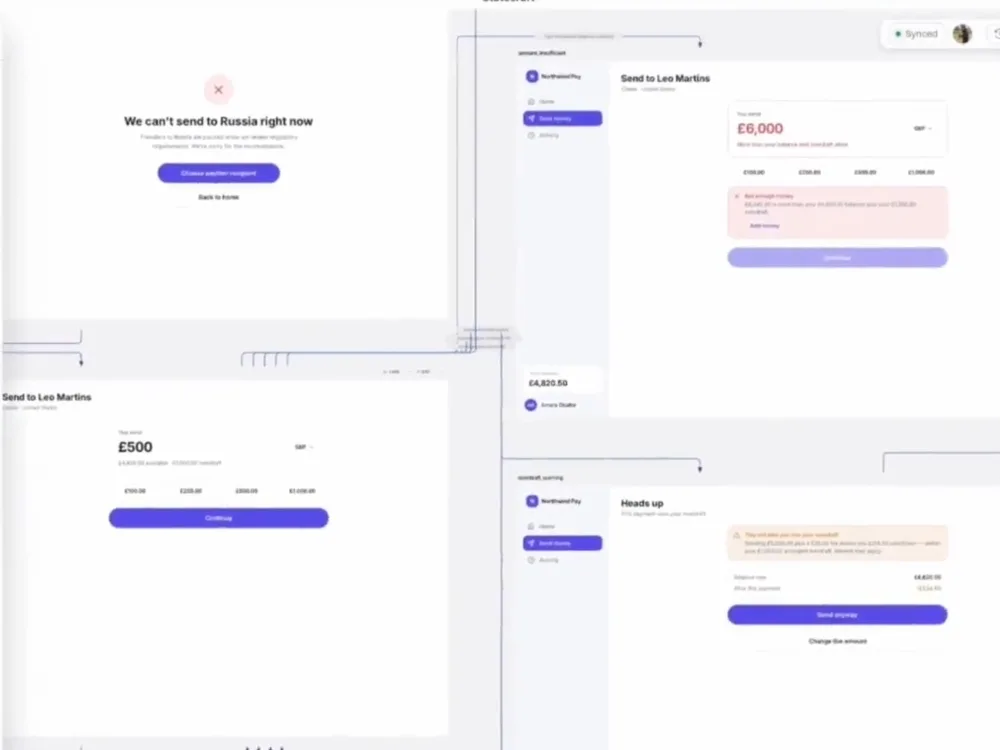
Error states included. Failure and edge-case screens are imported alongside the main path.
Sync and review
When a component changes or a pull request opens, Statecraft updates the screens it affects.

Design system changes sync. Add Statecraft to CI and projects update when a component or token changes.

A preview on every pull request. The PR gets a link to each flow it changes. No preview environment or test logins.

Comments pinned to components. Feedback attaches to the element it's about.

Handoff to Linear, GitHub or a PR. An agent writes an implementation plan, or opens a pull request against your repository.
Clickable prototypes. Wire screens together and share a link anyone can click through.
Work together live. See your team's cursors and edits as they happen.
Version history. Every change is saved as a version you can go back to.
Design system import. An agent reads your component library and sets it up for you.
Any git host. GitHub, GitLab, Gitea, Bitbucket or your own server.
Files on disk. Every screen is a file in a synced folder, so any editor can open it.
Desktop app. Builds your design system on your Mac as you save.
Command line. Create projects, run imports and publish from the terminal or CI.
A design tool for product teams. You design screens and flows on a canvas with the React or Vue components your engineers ship.
Yes. Point Statecraft at the repository that holds your components. An agent reads it, builds the components and checks that each one renders. This takes about 10 minutes. You can also start with one of 30 open-source design systems.
React and Vue 3. Each project uses one framework. Your components can be styled with CSS, Sass, Tailwind or CSS-in-JS.
GitHub, GitLab, Gitea, Bitbucket or your own git server. With the Mac app you can also import from a folder on your computer without connecting a git host.
Yes. The Mac app keeps every screen as a file in a folder on your computer. Any coding agent can edit those files, and the canvas updates as it does.
Agents read the code they need on our servers and send it to Anthropic's Claude models to do the work. We do not use your code to train models, and we do not share it between customers.
Only when you ask it to, for example to open a pull request with a change you designed. Reading your repository does not change it.
Only people who edit. Viewing, commenting and clicking through prototypes are free. Editors pay €20 a month each after a 30-day trial, and you do not need a card to start the trial. See pricing.
Book a call, or email dominic@statecraftapp.com.